
Island-style reminders for your Mac: how Notchpals works
Notchpals puts reminder characters in your Mac's notch, or in an island it draws on desktops and older MacBooks. How a visit works and when it stays quiet.
If you like the way the iPhone's Dynamic Island grows for a moment and then gets out of the way, Notchpals uses the same idea at the top of your Mac's screen for something Apple's island doesn't do: reminders. A character slides down from the notch with a nudge about a glass of water, a stretch, your eyes or your bedtime, waits a few seconds for an answer, then tucks itself back in. On a Mac with no notch, such as an iMac or a MacBook Neo, Notchpals paints a notch-shaped island at the top center of the main display, and the characters come out of that instead.
It is not Apple's Dynamic Island, and it doesn't try to be. It doesn't show music, calls, AirDrop, files, notifications or Live Activities. It shows a character, a line and two buttons. This post covers how a visit works, who is in your crew, how often they speak, when they stay quiet, and what Notchpals leaves out on purpose.
Apple's island and this one
Apple's Dynamic Island on the Mac is on one machine, the MacBook Pro with PROLED XDR Display, from 6 November 2026. It is built for the system: Spotlight, Siri AI and Live Activities live there, and Apple's examples include taking a phone call, controlling music and accepting an AirDrop request.
Notchpals is for the top of every other Mac. Where there is a notch, it uses it: every MacBook Air from M2 on, and the 14 and 16-inch MacBook Pros with a notch, including the M6 and the mini-LED M5 Pro and M5 Max models. On a MacBook Neo, an M1 MacBook Air, a 13-inch MacBook Pro, an iMac, a Mac mini, or a MacBook with its lid closed, it draws the island instead. If a notched MacBook is open beside another display, the characters stay in the notch, even when the other display is the main one. Notchpals needs macOS 14 or later and works with Intel Macs as well as Apple silicon.
What a visit looks like
- The notch, or the drawn island, opens.
- A character slides down, and a speech bubble shows its name, its line and two buttons, Later and Done. Each character has eight faces (happy, curious, caring, sleepy, annoyed, angry, proud and love), and every line comes with the face that fits it.
- The reminder stays up for about 9 seconds. Hovering over it keeps it up.
- Press Done and the character thanks you. Press Later, or ignore it, and it comes back once, 20 minutes later, if the reminder still applies. A second Later lets it go.
Blip, the alien who looks after your eyes, takes a Done like this:
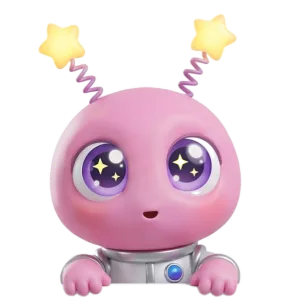
BlipYou did it! Do your eyes feel brand new? Tell me everything!
A few smaller touches keep it from feeling mechanical. Hover over the notch for a moment and you get a peek. Click a character while it is out and it says something back. And a character won't repeat a line within 3 days, so a reminder you see every day doesn't go stale.
The crew
Every character looks after one area, and there are ten: Water, Meals, Posture, Movement, Eyes, Sleep, Focus, Self-care, Tech care and Schedule. Your crew has at most one character per area, so the water reminder comes from your Water character and the stand-up nudge from your Movement one. Only one is on stage at a time.




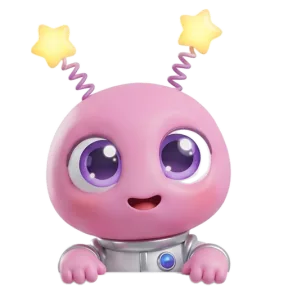
Setup happens in the notch itself, guided by Blip, in four steps: hello; pick your crew; timing, where you set your bedtime, lunch and dinner, calendar access, your birthday and whether to start at login, then answer a sample reminder; and done. Blip is always in for Eyes, and you pick two more areas.
One crew member is the host. It says good morning the first time you sit down between 5 AM and noon, welcome back after 15 minutes or more away, and happy birthday if you set your birthday. You can change the crew any time in Settings > Crew, from "Your crew" in the menu bar, or in Browse, where every character also has a "Try in notch" button so you can see it on your own screen first. How to pick your Notchpals crew goes through which characters cover what.
How often it speaks
Notchpals is deliberately gentle. There are two kinds of moments:
- Timed moments, like breakfast, lunch, bedtime and the first glass of water of the day, come at most once a day, in their own window.
- Repeating reminders, like water, posture checks, eye breaks, stretches and blinks, share one daily budget across the whole crew. In Settings, "Repeating reminders a day" is Calm (4), Normal (8, the default) or Chatty (12), spaced at least about two hours, one hour or 40 minutes apart.
There are always at least 20 minutes between visits you didn't ask for. Characters only say what fits the moment: no lunch line in the morning, no battery line while the Mac is charging or full, no bedtime line at noon. And timing goes by the time you actually spend at the Mac, so a long lunch away from the desk doesn't count as screen time.
That is the main difference from a timer. A timer fires on the clock and doesn't care what you are doing. An island that opens a few times a day, for something that fits the hour, is much easier to keep around for months.
When it stays quiet
The island stays shut:
- whenever an app is using the microphone or camera, so no character drops into a call or a recording;
- when a full screen app is in front on the display the characters use, such as a film or a presentation;
- when you step away, which means two minutes with no keyboard or mouse. Away time isn't counted.
You can also pause it from the menu bar for 1 hour or until tomorrow morning. The menu bar icon is a pair of eyes, and they close whenever the crew is quiet, so one glance tells you whether anyone might come out.
If you have a Focus character in your crew, you can start a focus session from the menu bar, for 25 or 50 minutes. During one, only Focus moments, a critical battery and a meeting that is about to start can visit.
One thing it does not do: Notchpals doesn't detect macOS Focus modes, Do Not Disturb or screen sharing. If you are about to present from a window, pause it yourself first.
What it leaves out
Being clear about this saves you a download you don't need:
- No music, files or system overlays. No music controls, file shelf, AirDrop, calendar view, notifications, volume or brightness overlays, and no Live Activities. If you want those in the notch, the best Dynamic Island apps for Mac compares apps that do them.
- No sounds or voice. Everything happens on screen.
- No schedule of your own. You choose Calm, Normal or Chatty, not "every 25 minutes", and there are no quiet hours to set.
- No tracking. No streaks, stats or water logging. Notchpals doesn't know whether you drank the glass or stood up; it trusts your Done.
- No custom characters. The crew comes from the catalog in Browse; you can't upload your own.
- Mac only, English only. No iPhone, iPad or Windows version, and no Mac App Store version.
The calendar is the one place it reaches into your data, and only if you allow it, during setup or later in Notchpals Settings > General > Calendar. Schedule characters use it to know when your next meeting starts, so they can nudge you a few minutes before. Notchpals never reads titles, people or notes, and it skips declined, cancelled and all-day events.
What it knows
There is no account and no analytics in the app. What it reads to time a reminder stays on the Mac: the time, your meal times, bedtime and birthday; how long since you last used the keyboard or mouse (never what you typed); whether the mic or camera is in use (never what they hear or see); whether a full screen app is in front; which app is in front, for the scrolling check; and battery, uptime and disk space for Tech care. It goes online only to download characters, check the license, record the characters you own, and check for updates once a day.
Trying the idea
A trial with every feature starts when you finish setting up your crew. When it ends, your crew rests until you buy, and nothing is deleted. Use it to find out whether you like a character dropping by, or whether you would rather it didn't.
If you press Later a lot in the first few days, that is normal. Blip doesn't mind:
BlipLater is a funny word. I'll ask again soon, okay?
That is the whole idea. A black shape at the top of the screen that opens a few times a day for something good for you, says one line, and closes again.
More on using notchpals
 Using NotchpalsEye break reminder on a Mac: how to set one for 20-20-20How to set an eye break reminder on a Mac for the 20-20-20 rule, why one every 20 minutes is too much for most people, and a gentler rhythm that sticks.
 Using NotchpalsMeet the new Notchpals characters: 11 new faces in the notchNick, Debug, Jot, Lolo, Otto, Clover, Matsu, Maple, Professor Hoot, Nod and Walter: the new Notchpals characters, what each looks after and who each suits.
- Using NotchpalsStand up reminder on a Mac: three ways to set one upThree ways to get a stand up reminder on a Mac: an Apple Watch, a repeating reminder in Reminders, or one that waits until you have sat for about an hour.