
Eye exercises for computer users: what helps and what doesn't
Simple eye exercises for computer users: looking far, palming, blinking sets and focus shifts. What they ease, what they can't fix, and why breaks matter more.
The eye exercises worth doing at a computer are the simple ones that relax your focus and wet the surface of your eyes: looking far away, slow blinking, shifting focus between near and far, and palming. They can ease tired, dry eyes for a while. They can't correct your eyesight or replace glasses, and doing them often, as part of regular breaks, matters far more than any particular drill.
Search for eye exercises and you will find long routines with big promises attached. This post sticks to the handful that are pleasant, take under a minute and fit at a desk, then is straight with you about their limits, and about what helps screen eyes more.
Do eye exercises work for eye strain?
Partly, and for a simple reason. Screen strain mostly comes from two things: the focusing muscles inside your eyes holding near focus for hours, and blinking less while you concentrate, which lets the surface of the eye dry out. Exercises that make you look far away or blink fully address both of those directly, for as long as you keep doing them.
So the honest answer is that the useful exercises work because they are breaks. A minute spent looking out of a window and blinking slowly is a minute of rest for the focusing muscles and a fresh coat of tears. The exercise is the shape you give the break.
Can eye exercises improve your eyesight?
No, not in the way many routines online promise. Nearsightedness, farsightedness, astigmatism and the close-focus changes that arrive in your 40s come from the shape and flexibility of the eye, and exercises don't change those. Eye care professionals generally don't recommend exercises as a way to stop wearing glasses. If you need glasses, you need glasses.
Exercises also can't make up for a poor setup. A screen that is too close, too bright or covered in glare keeps straining your eyes in between them. And they are not a treatment: eye pain, double vision, blurred vision that doesn't clear and persistent headaches need an optometrist or a doctor, not a routine.
There is one real exception worth knowing about. Some eye-teaming problems, such as convergence insufficiency, where the two eyes struggle to turn in together for close work, are treated with exercises, often called vision therapy. That is prescribed and supervised by an eye care professional after an exam, and it is a different thing from the general routines below.
Five simple eye exercises for your desk
None of these needs equipment, and each takes under a minute. If anything makes your eyes hurt or leaves you dizzy, stop.
1. The long look
Look away from the screen at the farthest thing you can see, ideally out of a window and at least 20 feet away. Let your eyes rest on it for 20 seconds or so without trying to read anything. This is the heart of the 20-20-20 rule, and if you only do one exercise, make it this one. The focusing muscles relax most when the view is far.
2. A set of slow blinks
Close your eyes slowly and fully, as if you were falling asleep, hold for a second or two, then open them. Repeat four or five times. The aim is complete blinks, where the top lid really meets the bottom one, because those spread tears across the whole eye. Screen blinks tend to be quick and partial. Why you blink less at the computer explains why, and how to catch yourself doing it.
3. Near and far focus shifts
Hold a thumb or a pen about 10 inches in front of your face. Focus on it for a few seconds until it's sharp, then look at something across the room for a few seconds until that's sharp. Go back and forth five to ten times, slowly. It gives the focusing muscles something to do besides hold one distance, and it is a good way to notice whether one distance has become harder to bring into focus. If it has, mention it at your next eye exam.
4. Palming
Rub your palms together for a few seconds to warm them, then cup them gently over your closed eyes, fingers resting on your forehead and the heels of your hands on your cheekbones. Don't press on the eyes. Breathe slowly and stay there for 30 seconds to a minute. Palming isn't known to do anything for your eyesight, but it is a pleasant way to rest: warmth, darkness and nothing to focus on at all.
5. A slow look around
Keep your head still and look slowly up, then down, then left, then right, pausing a moment at each. Then trace a wide, slow circle in each direction. Many people find it loosens up eyes that have spent an hour fixed on one rectangle, and the pauses are a natural place for a couple of full blinks.
Why breaks matter more than drills
The strain from screen work builds over unbroken stretches of close focus. A five-minute routine once a day, followed by another long stretch of staring, doesn't undo much. Thirty seconds of looking out of a window, many times a day, does more.
So treat the exercises above as things to do during breaks, not as a replacement for them. A simple day might look like this:
| When | What to do | How long |
|---|---|---|
| About every 20 minutes | The long look, with a few slow blinks | 20 seconds |
| Once or twice an hour | A set of slow blinks | 10 seconds |
| Every hour or two | Stand up, look out of a window, try focus shifts or palming | A few minutes |
| End of the day | Palming, before you leave the desk | A minute |
The other big wins aren't exercises at all: a screen about an arm's length away and a little below eye level, brightness that roughly matches the room, text large enough that you don't lean in, and air that isn't blowing across your face.
When to see an optometrist
If your eyes are still aching, blurring or dry after a couple of weeks of regular breaks and a better setup, book an eye exam. An old prescription, or none when you need one, is a frequent reason screen work feels tiring, and no exercise fixes it. Tell the optometrist how far away your screen sits and roughly how long you spend at it each day.
See someone promptly for eye pain, a red eye, double vision, or blurred vision that doesn't clear with rest. Get same-day care for sudden flashes of light, a rush of new floaters, or a shadow creeping across part of your vision.
A shoebill to call the breaks
The exercises are easy. Stopping to do them in the middle of real work is the hard part, so hand the stopping to someone else.
In Notchpals, that job goes to a character who appears at your Mac's notch. Bill, a shoebill (a bird known for standing stock still and staring), is one of the Eyes characters who can hold it. A few times a day Bill turns up to call an eye break, which is the long look from the first exercise:
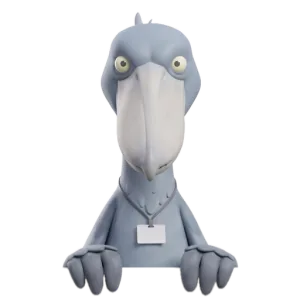
BillFind the farthest wall. Stare it down. Twenty seconds. The wall blinks first.
Bill's other regular visit is a blink break, the slow blinks from the second exercise. Both come out of a daily budget that every repeating reminder shares (Calm, Normal or Chatty in Settings), and even Chatty keeps those visits at least 40 minutes or so apart. So Bill restarts the habit a few times a day, and the 20-second looks in between are yours to take. Hang them on things you already do, such as sending a message or waiting for a page to load, and they soon need less reminding.
More on eyes and screens
 Eyes and screensEye strain headache: where it hurts and what helpsAn eye strain headache usually sits in the forehead, temples or behind the eyes. Why screens cause it, quick desk relief, and when to see an optometrist.
 Eyes and screensEye twitching: why your eyelid jumps on long screen daysEye twitching on long screen days is usually harmless and tied to tiredness, caffeine, stress or strained eyes. What helps, and when to see a doctor.
 Eyes and screensReduce White Point on Mac: what to use insteadReduce White Point is an iPhone and iPad setting with no Mac twin. The Mac settings that soften a glaring white screen instead, and who each one suits.